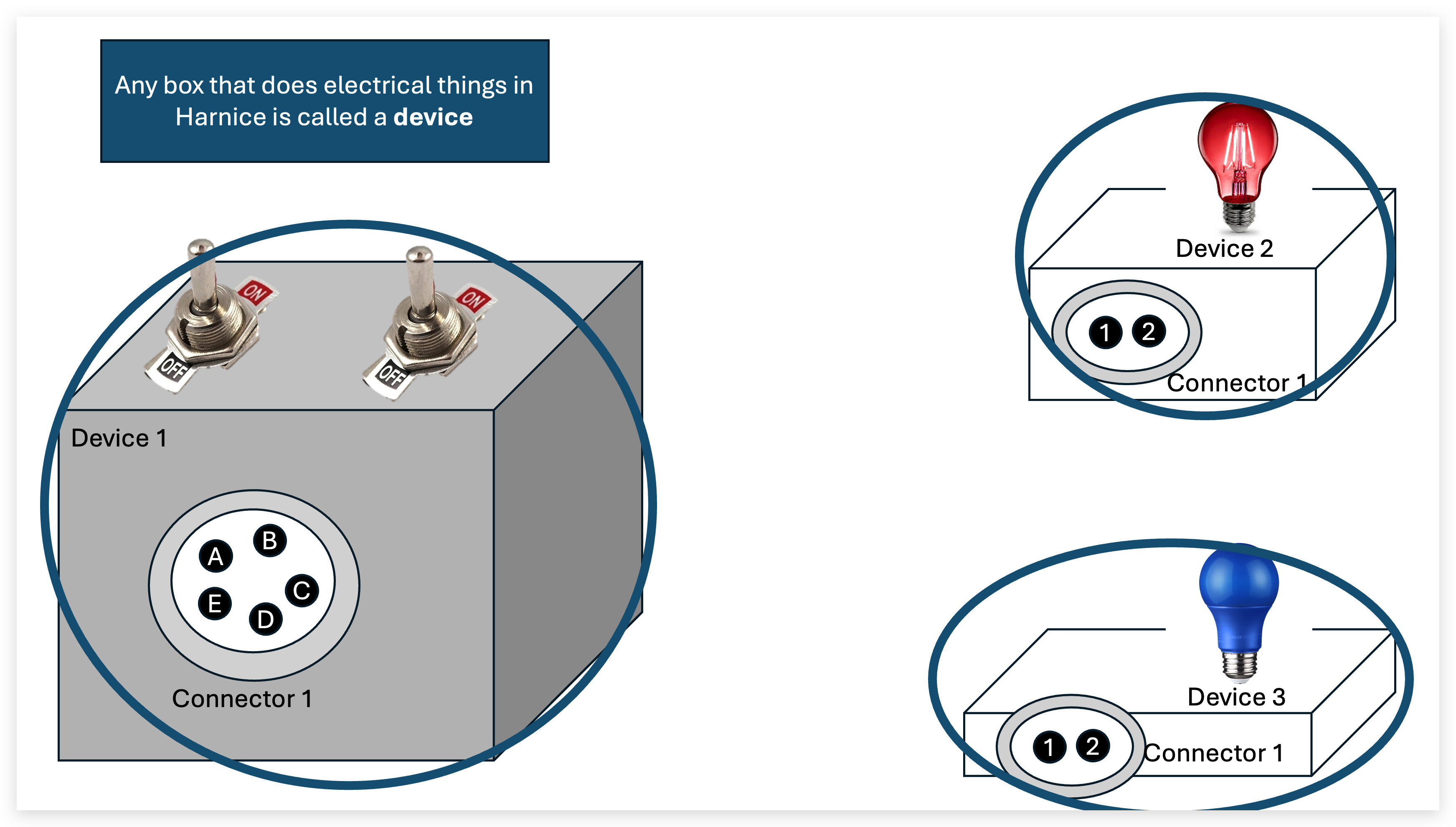
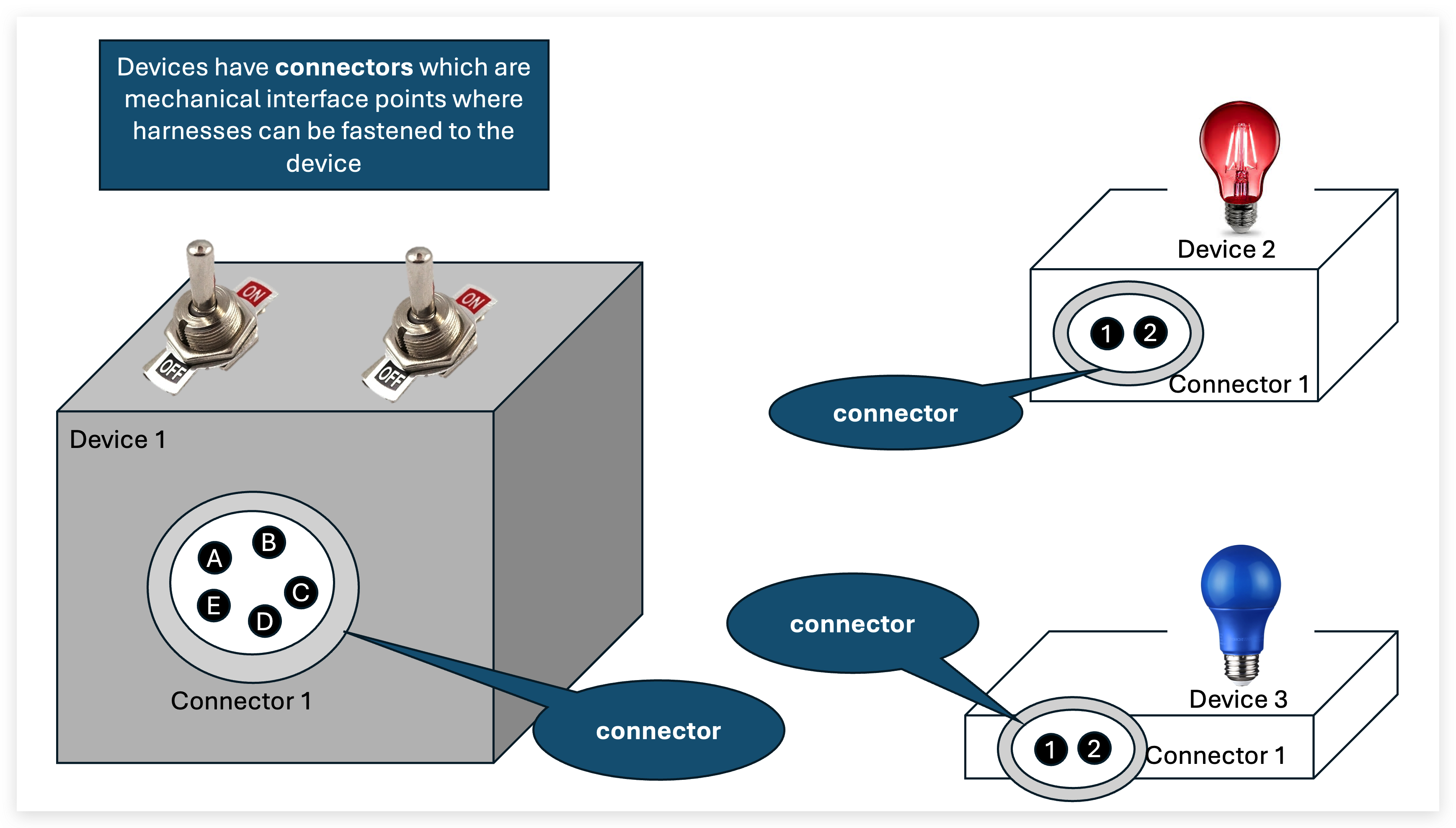
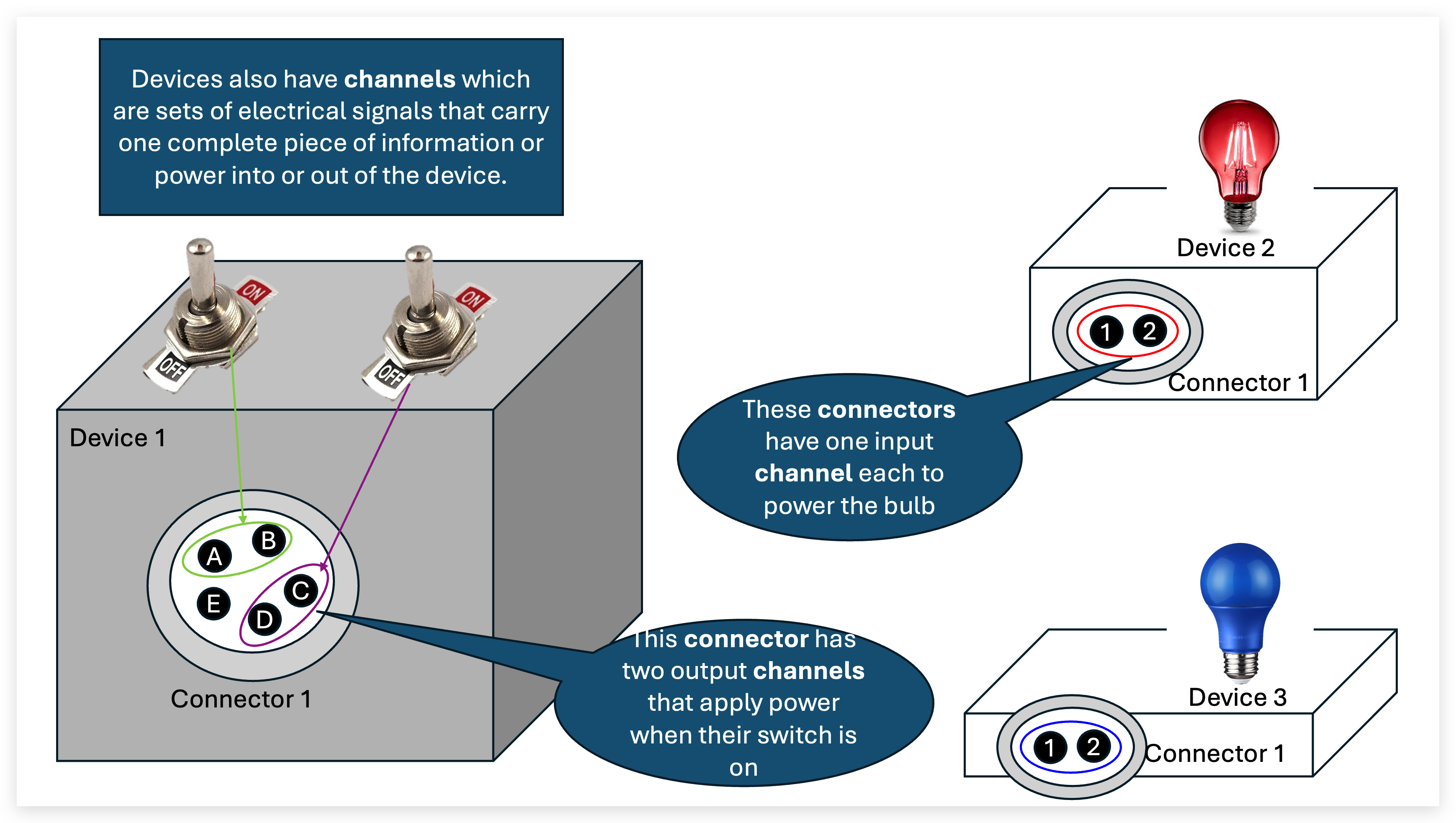
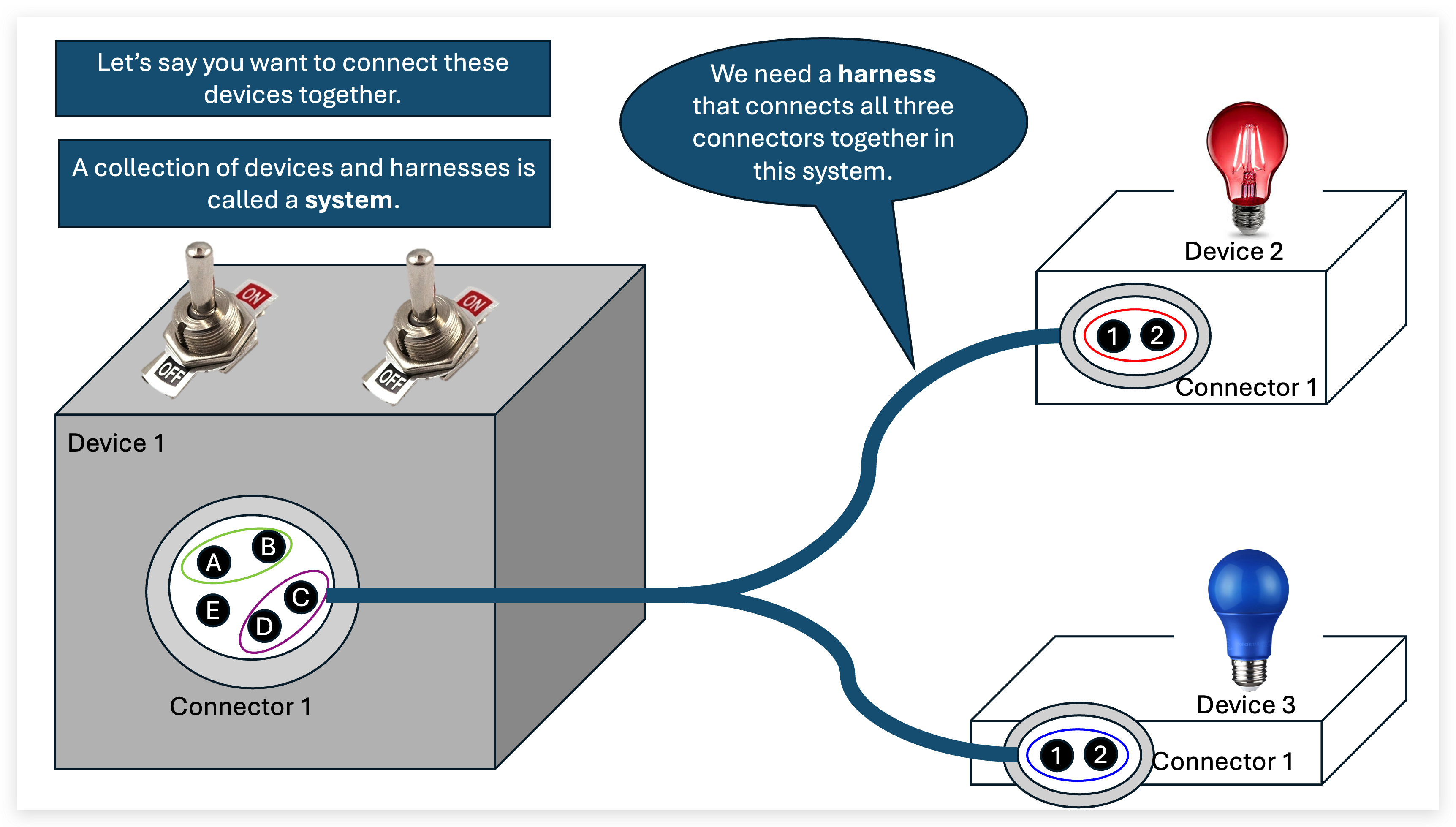
Workflow Overview
Harnice supports different kinds of project types, each of which have basic, distinct properties and store information in their respective ways.
When you "run" Harnice, you're taking the input files of one project, and per a set of rules that you define, output files are generated. This process is called a build.
Some projects have input and output files that are compatible with each other. Here's the basic workflow.
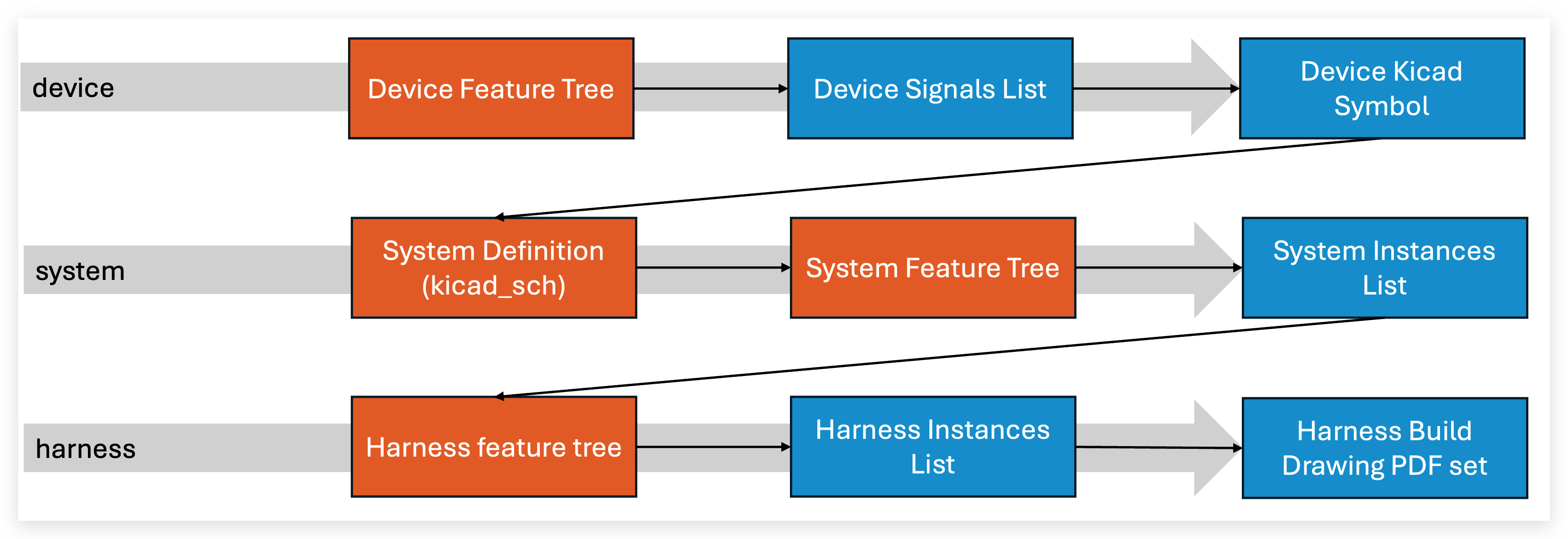
each gray bar is a build operation on a different project, orange is a user-defined set of build instructions, and blue is a file.
Build instructions (project as-intended)
Most projects have build instructions (a Python script), which is inspired by 3D CAD modeling. It's written directly in Python, and besides from some housekeeping that goes on in the background, is the bulk of what's happening when you build a project.
Inside the build instructions file is where you can write your rules on how to build your project. Here's some ideas about how you can express your build intent in logical language:
- If a harness mates with a device's ethernet socket, specifiy an RJ45 connector on that end of the harness.
- If a harness contains signals that drive a safety-critical valve, clad that harness with red sleeving.
- If a system has more than 9 output devices connected to an input device that has 8 inputs, throw an error.
- If a wire is conducting a thermocouple signal, use special cable and contacts.
- Specify a label to be applied to a harness whose text is derived from the name of the harness's mating device.
- If part x is called out as a component of a harness, and part x always requires tool y set to z, add a buildnote with a leader to x that says y-z.
Here is the default build instructions you get when you try to build a project for the first time. You'd add your logic in here somewhere.
Keep an eye out for how the script references files for the project it's operating on, for other projects, and how it generates outputs all in the same stroke as performing the derivation of the part.
Default harness build instructions
from doctest import run_docstring_examples
import math
import os
import random
from harnice import fileio, state
from harnice.utils import (
    circuit_utils,
    cable_utils,
    bundle_network_utils,
    note_utils,
    library_utils,
    build_utils,
    system_utils
)
from harnice.lists import (
    instances_list,
    post_harness_instances_list,
    rev_history,
    flattened_network,
    chosen_network,
    available_network
)

# ===========================================================================
#                 pull harness definition from system
# ===========================================================================

system_utils.import_harness_from_harnice_system(
    system_pn=rev_history.info().get("source_part_number"),
    system_rev=rev_history.info().get("source_revision"),
    system_lib_repo=rev_history.info().get("source_lib_repo"),
    system_lib_subpath=rev_history.info().get("source_subpath"),
    target_harness=rev_history.info().get("source_refdes"),
)
rev_history.overwrite(
    {
        "desc": f"HARNESS '{rev_history.info().get('source_refdes')}' FROM SYSTEM '{rev_history.info().get('source_part_number')}-{rev_history.info().get('source_revision')}'",
    }
)

# ===========================================================================
#                  HARNESS BUILD RULES
# ===========================================================================

# Connector policy lives on the parent system.
build_utils.run_instruction_from_relative(
    "connector_chooser",
    rev_history.info().get("source_part_number"),
    rev_history.info().get("source_lib_repo"),
    rev_history.info().get("source_subpath"),
    rev_history.info().get("source_revision"),
)

# If you want to define build rules local to this harness, write them here.
# Don't forget to rely on pre-defined functions and examples in the ribbon toolbar above.

# After assigning parts to instances, import them into this harness's file tree.

instances_list.raise_error_on_unassigned_connectors()

for instance in instances_list.read():
    if instance.get("item_type") in ["harness_connector", "backshell"]:
        library_utils.pull(instance)

# ===========================================================================
#          PROCESS AVAILABLE NETWORK DOWN INTO A CHOSEN NETWORK
# ===========================================================================

# available network (cad or manual) -> chosen network (modified subset) -> flattened network (visually arranged in 2D)

available_network = available_network.load()

# Assign nodes to any segments that may not have nodes attached
available_network = chosen_network.end_all_segments_in_nodes(available_network)

# Gather the collection of all instances with item_type == node
needed_nodes = []
for instance in instances_list.read():
    if instance.get("item_type") == "node":
        name = instance.get("instance_name")
        if name not in needed_nodes:
            needed_nodes.append(name)

# Ensures that every node in the list is present in the network.
missing_nodes = chosen_network.ensure_nodes_exist(
    input_network=available_network,
    set_of_required_nodes=needed_nodes,
)

# Generate geometry for required nodes that the available network did not provide.
# Set to False to raise an error instead.
if True:
    for missing_node in missing_nodes:
        existing_nodes = available_network.get("nodes") or []

        # Empty network: park at the origin. Otherwise sprout a short random
        # leg off the first existing node.
        new_node_location = [0, 0, 0]
        if existing_nodes:
            hub = existing_nodes[0]
            new_node_distance_from_hub = random.randint(6, 18)
            new_node_angle_from_x_axis = math.radians(random.randint(0, 359))
            new_node_location = [
                hub.get("location")[0] + new_node_distance_from_hub * math.cos(new_node_angle_from_x_axis),
                hub.get("location")[1] + new_node_distance_from_hub * math.sin(new_node_angle_from_x_axis),
                hub.get("location")[2],
            ]

        available_network = bundle_network_utils.new_node(
            available_network,
            new_id=missing_node,
            new_location=new_node_location,
        )

        # Connect back to the hub so the new node is not floating.
        if existing_nodes:
            available_network.setdefault("segments", []).append({
                "segment_id": f"{missing_node}_leg",
                "location_at_end_a": list(hub.get("location") or [0, 0, 0]),
                "location_at_end_b": new_node_location,
                "spline_control_points": [],
            })
else:
    if len(missing_nodes) > 0:
        raise ValueError(f"Missing node(s) {missing_nodes}")

# Find any possible solution within the network
found_solutions = chosen_network.calculate_possible_sub_networks(
    input_network=available_network,
    set_of_required_nodes=needed_nodes,
)

# Return just the networks that contain segments or nodes with id's in their respective lists.
if len(found_solutions) > 1:
    sorted_solutions = chosen_network.find_network_with(
        input_networks=found_solutions,
        segment_ids=["S12"],
    )
    found_solutions = sorted_solutions

# Ensure only one solution is found
number_of_found_solutions = len(found_solutions)
if number_of_found_solutions != 1:
    raise ValueError(f"Available network contains {number_of_found_solutions} solution(s)")
bundle_network = found_solutions[0]


# Clock a backshell towards the next nearest node in the chosen network
# bundle_network = bundle_network_utils.clock_backshell(
#     network=bundle_network,
#     connector_group="P1",
#     towards_node="incident",
#     round_to_nearest_angle=15,
# )

# Move chosen nodes around to keep the mating faces of the connectors at the same position as available based on the size of the assigned parts
for instance in instances_list.read():
    group = instance.get("connector_group")
    node_id = f"{group}.node"
    if instance.get("item_type") == "backshell":
        bundle_network = bundle_network_utils.clock_backshell(bundle_network, group)
    elif instance.get("item_type") == "harness_connector": # if it's a connector that has no backshell, move chosen node to the connector
        if instances_list.instance_in_connector_group_with_item_type( # backshell-doesn't-exist check
            instance.get("connector_group"), "backshell"
        ):
            continue
        bundle_network = bundle_network_utils.move_node(
            bundle_network,
            node_id,
            bundle_network_utils.output_offset(instance, "3d-mate"),
        )

# ===========================================================================
#                  FLATTEN THE CHOSEN NETWORK
# ===========================================================================

# Save the chosen network back to disk
chosen_network.save(bundle_network)

# Build the flattened network
flattened_network.derive(bundle_network)


# ===========================================================================
#                  ASSIGN CABLES AND CONDUCTORS
# ===========================================================================

# process the cables recommended by the system
cables_created = [] # fill up with cable refdes's as they get processed

for instance in instances_list.read():
    if instance.get("item_type") != "conductor":
        continue

    if instance.get("cable_group") not in ["", None]:
        if instance.get("cable_group") not in cables_created:
            cables_created.append(instance.get("cable_group"))
            cable_utils.new_cable(
                instance.get("cable_group"),
                instance.get("mpn"),
                instance.get("lib_repo"),
                instance.get("lib_subpath"),
            )

        cable_utils.prepare_for_conductor_assign(instance.get("instance_name"))

        cable_utils.assign_conductor_to_cable(
            instance.get("instance_name"),
            instance.get("cable_group"), # which cable instance name gets assigned
            instance.get("cable_identifier"), # which unique conductor within the cable goes here
        )


# assign a cable not recommended by the upstream system
# cable_utils.new_cable(
#     "W1",
#     "M27500-22SB2T23",
#     "https://github.com/harnice/harnice-aerospace-library",
#     "M27500",
# )
# cable_utils.assign_conductor_to_cable("conductor-1", "W1", "black")
# cable_utils.assign_conductor_to_cable("conductor-2", "W1", "white")


# route conductors between their end nodes, then map each cable onto the
# segments shared by all of its conductors
cable_utils.map_cables_and_conductors_to_segments()

# ===========================================================================
#                  CALCULATE SEGMENT BUNDLE DIAMETERS
# ===========================================================================
for instance in instances_list.read():
    if instance.get("item_type") == "segment":
        cable_utils.calculate_bundle_diameter(instance.get("instance_name"))

# ===========================================================================
#                   ASSIGN BOM LINE NUMBERS
# ===========================================================================
for instance in instances_list.read():
    if instance.get("item_type") in ["harness_connector", "cable", "backshell"]:
        instances_list.modify(instance.get("instance_name"), {"bom_line_number": True})
instances_list.assign_bom_line_numbers()

# ===========================================================================
#                  ADD BUILD NOTES
# ===========================================================================
for rev_row in rev_history.read():
    if rev_history._revs_equivalent(rev_row.get("rev"), state.rev):
        note_utils.make_rev_history_notes(rev_row)

for instance in instances_list.read():
    for note in note_utils.get_lib_build_notes(instance):
        note_utils.new_note(
            "build_note", note, affectedinstances=[instance.get("instance_name")]
        )

note_utils.assign_buildnote_numbers()

# example: add notes to describe actions
# note_utils.new_note(
#     "build_note",
#     "do this",
#     affectedinstances=["X1.B.conn"]
# )
# note_utils.new_note(
#     "build_note",
#     "do that"
# )

# example: combine buildnotes if their texts are similar
# note_utils.combine_notes("Torque backshell to connector at 40 in-lbs","Torque backshell to connector at about 40 in-lbs")


# ===========================================================================
#                  PUT TOGETHER FORMBOARD SVG INSTANCE CONTENT
# ===========================================================================
instances = instances_list.read()
note_instances = []
for instance in instances:
    if instance.get("item_type") == "note":
        note_instances.append(note_utils.parse_note_instance(instance))

formboard_overview_instances = []
formboard_detail_instances = []
for instance in instances:
    if instance.get("item_type") not in [
        "harness_connector",
        "backshell",
        "segment",
        "node",
        "origin",
    ]:
        continue

    formboard_overview_instances.append(instance)
    formboard_detail_instances.append(instance)

    detail_flag_note_counter = 1
    overview_flag_note_counter = 1

    if instance.get("item_type") in ["harness_connector", "backshell"]:
        formboard_detail_instances.append(
            note_utils.make_bom_flagnote(
                instance, f"flagnote-{detail_flag_note_counter}"
            )
        )
        detail_flag_note_counter += 1

        formboard_detail_instances.append(
            note_utils.make_part_name_flagnote(
                instance, f"flagnote-{detail_flag_note_counter}"
            )
        )
        detail_flag_note_counter += 1

    if instance.get("item_type") == "harness_connector":
        formboard_overview_instances.append(
            note_utils.make_part_name_flagnote(
                instance, f"flagnote-{overview_flag_note_counter}"
            )
        )
        overview_flag_note_counter += 1

    for note_instance in note_instances:
        if note_instance.get("note_type") == "build_note":
            if instance.get("instance_name") in note_instance.get(
                "note_affected_instances"
            ):
                formboard_detail_instances.append(
                    note_utils.make_buildnote_flagnote(
                        note_instance, instance, f"flagnote-{detail_flag_note_counter}"
                    )
                )
                detail_flag_note_counter += 1

        if note_instance.get("note_type") == "rev_change_callout":
            if instance.get("instance_name") in note_instance.get(
                "note_affected_instances"
            ):
                formboard_detail_instances.append(
                    note_utils.make_rev_change_flagnote(
                        note_instance, instance, f"flagnote-{detail_flag_note_counter}"
                    )
                )
                detail_flag_note_counter += 1

# ===========================================================================
#                  BUILD HARNESS OUTPUTS
# ===========================================================================
instances = instances_list.read()
scales = {"A": 0.25, "B": 0.3, "C": 1}

build_utils.run_macro(
    "bom_exporter_bottom_up",
    "library/macros/harness_artifacts",
    "https://github.com/harnice/harnice",
    artifact_id="bom-1",
)
build_utils.run_macro(
    "tooling_list_exporter",
    "library/macros/harness_artifacts",
    "https://github.com/harnice/harnice",
    artifact_id="tool_list-1",
)
build_utils.run_macro(
    "standard_harnice_formboard",
    "library/macros/harness_artifacts",
    "https://github.com/harnice/harnice",
    artifact_id="formboard-overview",
    dimension=0,
    scale=scales.get("A"),
    input_instances=formboard_overview_instances,
)
build_utils.run_macro(
    "standard_harnice_formboard",
    "library/macros/harness_artifacts",
    "https://github.com/harnice/harnice",
    artifact_id="formboard-detail",
    scale=scales.get("C"),
    input_instances=formboard_detail_instances,
)
build_utils.run_macro(
    "trace_layout_visualizer",
    "library/macros/harness_artifacts",
    "https://github.com/harnice/harnice",
    artifact_id="conductor_layout-1",
    trace_item_types=["conductor"],
    scale=scales.get("A"),
)
build_utils.run_macro(
    "trace_layout_visualizer",
    "library/macros/harness_artifacts",
    "https://github.com/harnice/harnice",
    artifact_id="cable_layout-1",
    trace_item_types=["cable"],
    scale=scales.get("A"),
)
build_utils.run_macro(
    "circuit_visualizer",
    "library/macros/harness_artifacts",
    "https://github.com/harnice/harnice",
    artifact_id="circuitviz-1",
    input_instances=instances_list.read(),
)
build_utils.run_macro(
    "revision_history_table",
    "library/macros/harness_artifacts",
    "https://github.com/harnice/harnice",
    artifact_id="revhistory-1",
)

build_notes_list_instances = []
for instance in instances_list.read():
    if (
        instance.get("item_type") == "note"
        and instance.get("note_type") == "build_note"
    ):
        build_notes_list_instances.append(instance)

build_utils.run_macro(
    "build_notes_table",
    "library/macros/harness_artifacts",
    "https://github.com/harnice/harnice",
    artifact_id="build_notes_table-1",
    input_instances=build_notes_list_instances,
)
build_utils.run_macro(
    "wirelist_exporter",
    "library/macros/harness_artifacts",
    "https://github.com/harnice/harnice",
    artifact_id="wirelist-1",
    input_instances=instances_list.read(),
)
build_utils.run_macro(
    "harness_step_builder",
    "library/macros/harness_artifacts",
    "https://github.com/harnice/harnice",
    artifact_id="harness-step-1",
    chosen_network=bundle_network,
    input_instances=instances_list.read(),
)
# Each run_macro call is one PDF drawing (switch instances in the console to edit layout).
# page_setup is the list of pages; edit it here, not in the PDF editor.
build_utils.run_macro(
    "pdf_generator",
    "library/macros/harness_artifacts",
    "https://github.com/harnice/harnice",
    artifact_id="pdf_drawing-1",
    page_setup={
        "pages": [
            {
                "tblock_mpn": "harnice_tblock",
                "tblock_lib_repo": "https://github.com/harnice/harnice",
                "tblock_lib_subpath": "library/titleblocks/",
                "page_size_in": [11.0, 8.5],
                "tblock_anchor": "bottom-right",
                "tblock_offset_px": [40.0, 40.0],
                "text_replacements": {
                    "tblock-key-pagedesc": "overview",
                    "tblock-key-desc": rev_history.info(field="desc"),
                    "tblock-key-pn": state.partnumber("pn"),
                    "tblock-key-drawnby": rev_history.info(field="drawnby"),
                    "tblock-key-rev": state.partnumber("R"),
                    "tblock-key-scale": scales.get("A"),
                    "tblock-key-sheet": "autosheet",
                },
            },
            {
                "tblock_mpn": "harnice_tblock",
                "tblock_lib_repo": "https://github.com/harnice/harnice",
                "tblock_lib_subpath": "library/titleblocks/",
                "page_size_in": [11.0, 8.5],
                "tblock_anchor": "bottom-right",
                "tblock_offset_px": [40.0, 40.0],
                "text_replacements": {
                    "tblock-key-pagedesc": "to-from table",
                    "tblock-key-desc": rev_history.info(field="desc"),
                    "tblock-key-pn": state.partnumber("pn"),
                    "tblock-key-drawnby": rev_history.info(field="drawnby"),
                    "tblock-key-rev": state.partnumber("R"),
                    "tblock-key-scale": scales.get("A"),
                    "tblock-key-sheet": "autosheet",
                },
            },
            {
                "tblock_mpn": "harnice_tblock",
                "tblock_lib_repo": "https://github.com/harnice/harnice",
                "tblock_lib_subpath": "library/titleblocks/",
                "page_size_in": [11.0, 8.5],
                "tblock_anchor": "bottom-right",
                "tblock_offset_px": [40.0, 40.0],
                "text_replacements": {
                    "tblock-key-pagedesc": "channel map",
                    "tblock-key-desc": rev_history.info(field="desc"),
                    "tblock-key-pn": state.partnumber("pn"),
                    "tblock-key-drawnby": rev_history.info(field="drawnby"),
                    "tblock-key-rev": state.partnumber("R"),
                    "tblock-key-scale": scales.get("A"),
                    "tblock-key-sheet": "autosheet",
                },
            },
        ],
    },
)
Default system build instructions
import os

from harnice import cli, fileio, state
from harnice.utils import system_utils, build_utils, library_utils
from harnice.lists import (
    instances_list,
    circuits_list,
    passthrough_map,
    channel_map,
    rev_history,
)
from harnice.project_types import chtype


# ===========================================================================
#                CHANNEL AND PASSTHROUGH MAPPING
# ===========================================================================
# system.build() already called channel_map.new() — one row per channel endpoint.
#
# A patch is two endpoints. Each key is:
#   (device_refdes, channel_id)                        # one endpoint
#   (device_refdes, channel_id, repeat_channel_id)     # two endpoints (a face)
# 3-tuple on a single-instance channel is an error; omitting the repeat on a
# two-instance channel is an error.
# Both endpoints (and any route() hop) must be in the same group of connected
# harnesses. Unmated terminating connectors are in no group.
#
# channel_map.map(from_key, to_key=None, multi_ch_junction_key="")
#
# endpoint → endpoint:
# channel_map.map(("MIC1", "out1"), ("PRE1", "in1"))
#
# map onto one passthrough face. That face must have no harness, or the
# last hop must be that harness.
# channel_map.map(("MIC1", "out1"), ("X1", "ch0", "A"))
#
# dual-map: two map() calls to the two faces of the same passthrough.
# consumes both as patch ends; does not write a passthrough-map row.
# channel_map.map(("MIC1", "out1"), ("X1", "ch0", "A"))
# channel_map.map(("SNK1", "in1"), ("X1", "ch0", "B"))
#
# multi-channel junction (no to_key):
# channel_map.map(("MIC1", "out1"), multi_ch_junction_key="JUNC1")

# remaining single-endpoint channels in the same group of connected harnesses,
# compatible types, alphabetical. Skips every channel with more than one endpoint.
channel_map.map_unmapped_compatibles_alphabetically()

# one row per passthrough channel, plus routing context (availables per
# group / from→to type / directionality). Dual-mapped passthroughs are omitted.
passthrough_map.new()

# add manual hops here (after new, before resolve).
# passthrough_map.route(
#     to_from_channel_device_refdes,  # either end of an already-mapped patch
#     to_from_channel_id,
#     intended_device_refdes,         # the passthrough device
#     intended_channel_id=None,       # omit to pick any available channel
#     repeat_channel_id=None,         # face the from-side arrives on; omit to infer
# )
# passthrough_map.route("MIC1", "out1", "X1")
# passthrough_map.route(
#     "MIC1", "out1", "X1", intended_channel_id="ch0", repeat_channel_id="A"
# )

# shortest remaining path; writes chain_of_connectors / chain_of_harnesses
passthrough_map.resolve()

# expand every mapped patch (and its passthrough path) into conductor circuits
circuits_list.new()

# ===========================================================================
#        SEED THE INSTANCES LIST FROM CIRCUITS THAT EXIST SO FAR
# ===========================================================================
system_utils.create_instances_from_circuits_list()


# ===========================================================================
#                 RUN SYSTEM DESIGN CHECKS
# ===========================================================================
connector_list = fileio.read_tsv("system connector list")
circuits = circuits_list.read()

# check for circuits with no connectors
system_utils.find_connector_with_no_circuit(connector_list, circuits)

# TODO: HARNESS VALIDATION (imported harnesses contain conductors that match the required circuits)

# ===========================================================================
#              ADD APPEARANCES TO CHANNEL TYPES AND CIRCUITS
# ===========================================================================
# color → channel types that should use that color
channel_type_colors = {
    "#D59A10": [
        (1, "https://github.com/harnice/harnice"),
        (2, "https://github.com/harnice/harnice"),
    ],
    "#4039A1": [
        (5, "https://github.com/harnice/harnice"),
    ],
}

# channel type → signal → color
circuit_signal_colors = {
    (1, "https://github.com/harnice/harnice"): {
        "pos": "#E24B4A",
        "neg": "#2E6B9F",
    },
    (2, "https://github.com/harnice/harnice"): {
        "pos": "#E24B4A",
        "neg": "#2E6B9F",
    },
    (5, "https://github.com/harnice/harnice"): {
        "chassis": "#4039A1",
    },
}

# apply the above appearances in the instances list as a simple base-color.
for instance in instances_list.read():
    color = None
    channel_type = instance.get("this_channel_from_channel_type")
    if instance.get("item_type") == "circuit":
        for mapped_channel_type, signals in circuit_signal_colors.items():
            if channel_type == str(mapped_channel_type):
                color = signals.get(instance.get("signal_of_channel_type"))
                break
    if not color:
        for mapped_color, channel_types in channel_type_colors.items():
            if channel_type in [str(t) for t in channel_types]:
                color = mapped_color
                break
    if color:
        instances_list.modify(
            instance.get("instance_name"),
            {"appearance": {"base_color": color}},
        )

# If you need more specific appearances, you can assign a full appearance dict to an instance like this:
# {
#     "base_color": "#E24B4A",          # required fill
#     "outline_color": "black",         # optional path outline
#     "parallelstripe": ["white"],      # optional stripes along the path
#     "perpstripe": ["red", "white"],   # optional stripes across the path
#     "twisted": "RH",                  # optional "RH", "LH", or None
# }
# example: twisted red/white pos conductor for channel type 1
# circuit_signal_colors[(1, "https://github.com/harnice/harnice")]["pos"] = {
#     "base_color": "#E24B4A",
#     "outline_color": "black",
#     "parallelstripe": ["white"],
#     "twisted": "RH",
# }
# instances_list.modify(
#     instance.get("instance_name"),
#     {"appearance": circuit_signal_colors[(1, "https://github.com/harnice/harnice")]["pos"]},
# )

# ===========================================================================
#              RECOMMEND CABLES ON CIRCUITS
# ===========================================================================
# Write rules at the system level based on system metrics to suggest information that is later consumed by
# downstream harness projects about what cables to apply onto what conductors.

# this_channel_from_channel_type → library cable fields for instances_list.modify
circuit_cable_mpns = {
    (1, "https://github.com/harnice/harnice"): {
        "mpn": "M27500-22SB2T23",
        "lib_repo": "https://github.com/harnice/harnice-aerospace-library",
        "lib_subpath": "M27500",
    },
    (2, "https://github.com/harnice/harnice"): {
        "mpn": "M27500-22SB2T23",
        "lib_repo": "https://github.com/harnice/harnice-aerospace-library",
        "lib_subpath": "M27500",
    },
}

# signal_of_channel_type → cable identifier (must be unique in the cable JSON)
circuit_cable_identifiers = {
    "pos": "black",
    "neg": "white",
    "chassis": "drain_wire",
}

# modify the instances list per the above
cable_counter = 1
channel_to_cable = {}  # keep every channel inside its own sequentially-counted cable
for instance in instances_list.read():
    if instance.get("item_type") != "circuit":
        continue

    channel_type = chtype.parse(instance.get("this_channel_from_channel_type"))
    if channel_type in circuit_cable_mpns:
        channel_group = instance.get("channel_group")
        if channel_group not in channel_to_cable:
            channel_to_cable[channel_group] = f"cable-{cable_counter}"
            cable_counter += 1
        instances_list.modify(
            instance.get("instance_name"),
            {
                **circuit_cable_mpns[channel_type],
                "cable_group": channel_to_cable[channel_group],
                "cable_identifier": circuit_cable_identifiers.get(
                    instance.get("signal_of_channel_type")
                ),
            },
        )


# ===========================================================================
#              SUBSYSTEM SYMBOLS
# ===========================================================================
# Each run_macro call is one symbol (switch instances in the console to edit it).
# scale is applied when dropping the system block diagram into the symbol as a primitive.
# Connector pins come from unique ICD connectors. The ICD is written after
# build instructions, so a second build is required after ICD changes.
# This macro also runs device signals-list / symbol-pin verification on the ICD.
subsystem_symbol_scale = 0.1

build_utils.run_macro(
    "subsystem_symbol",
    "library/macros/system_artifacts",
    "https://github.com/harnice/harnice",
    artifact_id="subsystem-symbol-1",
    subsystem_symbol_scale=0.1,
)

# Each run_macro call is one PDF file.
build_utils.run_macro(
    "pdf_generator",
    "library/macros/harness_artifacts",
    "https://github.com/harnice/harnice",
    artifact_id="pdf_drawing-1",
    page_setup={
        "pages": [
            {
                "tblock_mpn": "harnice_tblock",
                "tblock_lib_repo": "https://github.com/harnice/harnice",
                "tblock_lib_subpath": "library/titleblocks/",
                "page_size_in": [11.0, 8.5],
                "tblock_anchor": "bottom-right",
                "tblock_offset_px": [40.0, 40.0],
                "text_replacements": {
                    "tblock-key-pagedesc": "block_diagram",
                    "tblock-key-desc": rev_history.info(field="desc"),
                    "tblock-key-pn": state.partnumber("pn"),
                    "tblock-key-drawnby": rev_history.info(field="drawnby"),
                    "tblock-key-rev": state.partnumber("R"),
                    "tblock-key-scale": subsystem_symbol_scale,
                    "tblock-key-sheet": "autosheet",
                },
            },
        ],
    },
)


# ===========================================================================
#              FEATURES FOR RELATIVES
# ===========================================================================
# Any other harnice project can import and these functions using build_utils.run_instruction_from_relative().
# The following functions are defaults. Adjust, remove, duplicate them as needed. Features for relatives are
# intended to be used as a cohesive set of rules by any child part such that anything derived from this sytem
# follows the same set of rules.


def connector_chooser():
    # if the device-side connector MPN is x, assign mating connector y
    mating_connector_lookup_table = {
        #       x  :   y
        "XLR3M": {
            "mpn": "NC3FXX",  # Neutrik 3-pin female cable
            "lib_repo": "https://github.com/harnice/harnice-av-library",
            "lib_subpath": "neutrik",
            "lib_rev_used_here": None,
        },
        "XLR3F": {
            "mpn": "NC3MXX",  # Neutrik 3-pin male cable
            "lib_repo": "https://github.com/harnice/harnice-av-library",
            "lib_subpath": "neutrik",
            "lib_rev_used_here": None,
        },
        "DB25F": {
            "mpn": "M24308_4-3T",  # MIL-DTL-24308 25-pin crimp plug, nickel fluorocarbon
            "lib_repo": "https://github.com/harnice/harnice-aerospace-library",
            "lib_subpath": "dsub",
            "lib_rev_used_here": None,
        },
        "DB25M": {
            "mpn": "M24308_2-3T",  # MIL-DTL-24308 25-pin crimp receptacle, nickel fluorocarbon
            "lib_repo": "https://github.com/harnice/harnice-aerospace-library",
            "lib_subpath": "dsub",
            "lib_rev_used_here": None,
        },
    }

    # if the harness connector instance is named x, assign mating connector y
    # regardless of the device-side part number. leave empty unless you mean it.
    connector_by_instance_name = {
        #       x  :   y
        # "J1": {
        #     "mpn": "NC3FXX",
        #     "lib_repo": "https://github.com/harnice/harnice-av-library",
        #     "lib_subpath": "",
        #     "lib_rev_used_here": None,
        # },
    }

    for instance in instances_list.read():
        if instance.get("item_type") != "harness_connector":
            continue

        instance_name = instance.get("instance_name")

        mate = mating_connector_lookup_table.get(
            instance.get("device_side_connector_mpn")
        )
        if mate:
            instances_list.modify(
                instance_name=instance_name,
                instance_data=mate,
            )
            continue

        mate = connector_by_instance_name.get(instance_name)
        if mate:
            instances_list.modify(
                instance_name=instance_name,
                instance_data=mate,
            )
            continue

        # per-position rules (state.harness is the child's system position name):
        # if state.harness == "H01" and instance_name == "P1":
        #     instances_list.modify(
        #         instance_name,
        #         {
        #             "mpn": "NC3FXX",
        #             "lib_repo": "https://github.com/harnice/harnice-av-library",
        #             "lib_subpath": "neutrik",
        #             "lib_rev_used_here": None,
        #         },
        #     )
        #     continue

        # family choosers (D38999, Mighty Mouse, …) are in the connector-choosing
        # examples ribbon — insert them here, then continue if they assign an mpn.

        cli.warn(f"connector_chooser could not find a solution for {instance_name}")
Instances Lists, Signals Lists (project as-designed)
While having a concise set of rules is important to the definition of a project, it is not always sufficient as complete digital representation of the project. There's a difference between "as-intended" (build instructions) vs "as-designed". Harnice produces "as-designed" documentation for projects in various formats depending on the project type, but the following is a core Harnice design requirement:
There shall always be one single source-of-truth representing the as-designed project, from which all outputs or dependencies are derived.
Here are the "as-designed" filetypes of each designable project type:
| Project type | As-designed source of truth |
|---|---|
| systems, harnesses | instances list |
| device | signals list |
(the other project types have more than one but I'm not sure how to defend why that's ok at time of writing)
More information about these:
Instances Lists
Interacting with Instances Lists
An instances list is a list of every physical or notional item, idea, note, part, instruction, circuit, drawing element, thing, concept literally anything that describes how to build that harness or system.
Instances lists are the single comprehensive source of truth for the project you are working on. Other inputs—especially build instructions (your Python script)—build this list, and all output documentation are derived from it.
Columns
Columns are automatically generated when instances_list.new() is called. Additional columns for this kind of list may be added by the user.
| Column | Description |
|---|---|
harness |
the physical harness (harness refdes) that this instance is part of |
instance_name |
the unique name of this instance |
print_name |
the non-unique, human-readable name of this instance, used for printing on output documents |
bom_line_number |
if this instance represents a physical procurable good, it gets assigned a line number on a bill of materials |
mfg |
manufacturer of this instance |
mpn |
manufacturer part number |
item_type |
connector, backshell, whatever |
location_type |
each instance is either better represented by one or ther other |
segment_group |
the group of segments that this instance is part of |
segment_order |
the sequential id of this item in its segment group |
connector_group |
a group of co-located parts (connectors, backshells, nodes) |
channel_group |
other instances associated with this one because they are part of the same channel will share this value |
circuit_id |
which signal this component is electrically connected to |
circuit_port_number |
the sequential id of this item in its signal chain |
node_at_end_a |
derived from formboard definition |
node_at_end_b |
derived from formboard definition |
print_name_at_end_a |
human-readable name of this instance if needed, associated with 'node_at_end_a' |
print_name_at_end_b |
human-readable name of this instance if needed, associated with 'node_at_end_b' |
parent_csys_instance_name |
the other instance upon which this instance's location is based |
parent_csys_outputcsys_name |
the specific output coordinate system of the parent that this instance's location is based |
2d_translate |
dict {x, y, rotate} in the parent CSYS; used by flattened drawings |
3d_translate |
6DOF dict {x, y, z, alpha, beta, gamma}; α about X, γ about Z, used by STEP |
absolute_rotation |
manual add, not nominally used unless it's a flagnote, segment, or node |
csys_children |
imported csys children from library attributes file |
cable_group |
other instances associated with this one because they are part of the same cable will share this value |
cable_identifier |
which conductor in that cable this instance is assigned to (unique within the cable) |
length |
derived from formboard definition, the length of a segment |
length_tolerance |
derived from formboard definition, the tolerance on the length of a segment |
diameter |
apparent diameter of a segment <---------- change to print_diameter |
appearance |
see harnice.utils.appearance for details |
device_configuration |
compact JSON of filled configuration-setup answers (from BOM) |
note_type |
build_note, rev_note, etc |
note_number |
if there is a counter involved (rev, bom, build_note, etc) |
note_parent |
the instance the note applies to. typically don't use this in the instances list, just note_utils |
note_text |
the content of the note |
note_affected_instances |
list of instances that are affected by the note |
lib_repo |
publically-traceable URL of the library this instance is from |
lib_subpath |
path to the instance within the library (directories between the project type and the part number) |
lib_desc |
description of the instance per the library's revision history |
lib_latest_rev |
the latest revision of the instance that exists in the remote library |
lib_rev_used_here |
the revision of the instance that is currently used in this project |
lib_status |
the status of the instance per the library's revision history |
lib_releaseticket |
documentation needed |
lib_datestarted |
the date this instance was first added to the library |
lib_datemodified |
the date this instance was last modified in the library |
lib_datereleased |
the date this instance was released in the library, if applicable, per the library's revision history |
lib_drawnby |
the name of the person who drew the instance, per the library's revision history |
lib_checkedby |
the name of the person who checked the instance, per the library's revision history |
project_editable_lib_modified |
a flag to indicate if the imported contents do not match the library's version (it's been locally modified) |
lib_build_notes |
recommended build notes that come with the instance from the library |
lib_tools |
recommended tools that come with the instance from the library |
attributes_json |
if an instance is imported with an attributes json attached, it's added here |
device_side_refdes |
if device_connector, refdes of the device it plugs into |
device_side_connector_id |
if device_connector, name of the connector it plugs into |
device_side_connector_mpn |
if device_connector, mpn of the connector it plugs into |
device_side_from_cavity |
if circuit, cavity on the from side (from circuits list harness_from_cavity) |
device_side_to_cavity |
if circuit, cavity on the to side (from circuits list harness_to_cavity) |
harness_side_connector_id |
asserted name of the mating harness connector (from system connector list) |
this_harness_from_device_refdes |
if this instance is a channel, circuit, conductor, etc, the refdes of the device it interfaces with, just within this harness |
this_harness_from_device_channel_id |
if this instance is a channel, circuit, conductor, etc, the channel id in the device it interfaces with, just within this harness |
this_harness_from_device_connector_name |
if this instance is a channel, circuit, conductor, etc, the name of the connector it interfaces with, just within this harness |
this_harness_to_device_refdes |
if this instance is a channel, circuit, conductor, etc, the refdes of the device it plugs into just within this harness |
this_harness_to_device_channel_id |
if this instance is a channel, circuit, conductor, etc, the channel id in the device it plugs into, just within this harness |
this_harness_to_device_connector_name |
if this instance is a channel, circuit, conductor, etc, the name of the connector it plugs into, just within this harness |
this_channel_from_device_refdes |
if this instance is a channel, circuit, conductor, etc, the refdes of the device it interfaces with, at the very end of the channel |
this_channel_from_device_channel_id |
if this instance is a channel, circuit, conductor, etc, the channel id in the device it interfaces with, at the very end of the channel |
this_channel_to_device_refdes |
if this instance is a channel, circuit, conductor, etc, the refdes of the device it plugs into, at the very end of the channel |
this_channel_to_device_channel_id |
if this instance is a channel, circuit, conductor, etc, the channel id in the device it plugs into, at the very end of the channel |
this_channel_from_channel_type |
if this instance is a channel, circuit, conductor, etc, the type of the channel it interfaces with, at the very end of the channel |
this_channel_to_channel_type |
if this instance is a channel, circuit, conductor, etc, the type of the channel it plugs into, at the very end of the channel |
signal_of_channel_type |
if this instance is a channel, circuit, conductor, etc, the signal of the channel it interfaces with, at the very end of the channel |
debug |
the call chain of the function that last modified this instance row |
debug_cutoff |
blank cell to visually cut off the previous column |
Commands:
Use the following functions by first importing the module in your script like this: then use as written.
instances_list.new_instance(instance_name, instance_data, ignore_duplicates=False)
Add a new instance to the instances list.
Usage
new_instance(instance_name, instance_data, ignore_duplicates=False)
Args
instance_name: String; must be unique within the list.instance_data: Dict of column names to values. May includeinstance_name; if present it must match theinstance_nameargument or the code will fail.ignore_duplicates: If True, does nothing when an instance with the sameinstance_namealready exists. If False (default), raises an error on duplicate.
Returns
-1 on success. Raises on invalid input or duplicate (when ignore_duplicates is False).
instances_list.modify(instance_name, instance_data)
Update columns for an existing instance by name.
Args
instance_name: The unique name of the instance to modify.instance_data: Dict of column names to new values. Only provided keys are updated; others are unchanged.
Raises
ValueError if no instance with instance_name exists.
instances_list.remove_instance(instance_to_delete)
Remove one instance from the instances list.
Args
instance_to_delete: Instance row dict (or any dict) whoseinstance_namekey identifies the instance to remove. Matching is done byinstance_nameonly.
instances_list.new()
Create a new empty instances list file with only the standard header (COLUMNS). Overwrites existing file if present.
instances_list.assign_bom_line_numbers()
Assign sequential BOM line numbers to instances that have bom_line_number set to "True".
Groups by MPN and assigns the same line number to all instances sharing an MPN. Requires every such instance to have a non-empty mpn. Line numbers are assigned in order of first occurrence of each MPN.
Raises
ValueError if any instance marked for BOM has an empty mpn.
instances_list.attribute_of(target_instance, attribute)
Return the value of one column for a single instance.
String values that look like Python literals (list or dict, e.g. starting with `[` or `{`) are parsed with `ast.literal_eval` and the parsed value is returned; otherwise the raw string is returned.
Args
target_instance: Theinstance_nameof the instance to look up.attribute: The column name to read (e.g."mpn","harness").
Returns
The value of that column for the matching instance, or None if not found or attribute missing. List/dict-like strings are returned as list/dict.
instances_list.instance_in_connector_group_with_item_type(connector_group, item_type)
Return the single instance in a connector group with the given item type.
Args
connector_group: Theconnector_groupvalue to match.item_type: Theitem_typevalue to match (e.g. connector, backshell).
Returns
The matching instance row dict, or 0 if no match.
Raises
ValueError if connector_group or item_type is blank, or if more than one instance matches.
instances_list.seed_connector_nodes()
Creates a node instance for each connector group and parents each connector to it.
Intended for harness build instructions after connectors exist (for example after
importing a harness from a system). For each harness_connector or
device_connector with a non-blank connector_group:
- Ensures
{connector_group}.nodeexists (item_type/location_type"node") - If the connector has no
parent_csys_instance_name, sets it to that node withparent_csys_outputcsys_name"origin"
Connectors that already have a parent coordinate system are left unchanged.
instances_list.list_of_uniques(attribute)
Return a list of unique non-empty values for one column across all instances.
Args
attribute: The column name to collect (e.g."harness","item_type").
Returns
List of unique values; blanks and None are omitted. Order follows first occurrence in the instances list.
Signals Lists
Interacting with Signals Lists
A Signals List is an exhaustive list of every signal going into or out of a thing. Signals Lists are the primary way Harnice stores information about devices, and act as the source of truth for devices.
Signals List Validation Checks:
(These are automatically validated when you build the device that owns the list.)
General Signals List Rules
-
Every signal in the Signals List must be contained by a pre-defined channel type
Channel Types
Channel Types
How are channels mapped?
How to define a new channel type
- In a repository of your choice (or start with harnice_library_public on your own branch), navigate to
library_repo/channel_types/channel_types.csv - If you want channel definitions to be private and are therefore working in a private repository, ensure the repo's path is listed in file
repository_locations.csv(located at root of your harnice source code repo). The first column is the URL or traceable path, and the second column is your local path. - If you find the channel_type you're looking for, temporarily note it as a touple in a notepad somewhere with format
(ch_type_id, universal_library_repository). - If you don't find it, make a new one. It's important to try and reduce the number of channel_types in here to reduce complexity, but it's also important that you adhere to strict and true rules about what is allowed to be mapped to what. Modifications and additions to this document should be taken and reviewed very seriously.
chtype.path(channel_type)Resolve the on-disk path to the
channel_types.tsvfile for a given channel type.Args
channel_type: Channel type identifier in standard tuple format(channel_type_id, lib_repo)or any string representation thatparsecan understand (for example"(5, 'https://github.com/harnice/harnice')").
Returns
str: Absolute path tochannel_types.tsvat the root of the library repository that owns the given channel type.
Notes
- This does not filter rows; it only locates the TSV file that defines
all channel types for the given
lib_repo.
chtype.parse(val)Convert stored string into a tuple (chid:int, lib_repo:str). Handles both single tuples and extracts first tuple from lists.
chtype.compatibles(channel_type)Look up other channel types that are declared as compatible with the given channel type.
Args
channel_type: Channel type identifier in standard tuple format(channel_type_id, lib_repo)or any string representation thatparsecan understand.
Returns
list[tuple[int, str]]: List of(channel_type_id, lib_repo)tuples taken directly from thecompatible_channel_typescolumn ofchannel_types.tsv. Returns an empty list if no compatibles are defined or if the channel type cannot be found.
Data format
- The
compatible_channel_typescolumn must be an AST-parseable Python value:- Single tuple:
(1, "library_repo") - List of tuples:
[(1, "library_repo"), (2, "library_repo")]
- Single tuple:
chtype.attribute(channel_type, attribute)Read any additional column from
channel_types.tsvfor a given channel type.Args
channel_type: Channel type identifier in standard tuple format(channel_type_id, lib_repo)or any string representation thatparsecan understand.attribute: Column header name inchannel_types.tsvfor the value you want to read (for example"description","notes","voltage_rating").
Returns
Any: Value stored in the requestedattributecolumn for the matchingchannel_type_id. Returns an empty list[]if the channel type cannot be found.
Notes
- Reads
<library_root>/channel_types.tsv(same file aspath()). - Use this for any per-channel-type metadata you've added as extra columns
beyond the core ones like
channel_type_id,signals, andcompatible_channel_types.
chtype.signals(channel_type)Return the list of signal names associated with a specific channel type.
Args
channel_type: Channel type identifier in standard tuple format(channel_type_id, lib_repo)or any string representation thatparsecan understand.
Returns
list[str]: List of signal names from thesignalscolumn ofchannel_types.tsvfor the matchingchannel_type_id. If the column is blank or the channel type cannot be found, returns an empty list.
Data format
- The
signalscolumn is expected to be a comma-separated string, for example:"CAN_H, CAN_L, SHIELD".
chtype.is_or_is_compatible_with(channel_type)Return the given channel type plus all channel types declared as compatible with it.
Args
channel_type: Channel type identifier in standard tuple format(channel_type_id, lib_repo)or any string representation thatparsecan understand.
Returns
list[tuple[int, str]]: List of(channel_type_id, lib_repo)tuples where the first entry is the parsedchannel_typeitself and the remaining entries are the compatibles returned bycompatibles(channel_type).
Typical use
- Use this when validating or mapping channels and you want to treat a channel type as valid if it is either exactly the requested type or explicitly listed as compatible with it.
- In a repository of your choice (or start with harnice_library_public on your own branch), navigate to
-
Each signal in the signals list must have every other signal defined by its channel type also present in the list.
- you can't just define 'positive' if the channel type requires 'positive' and 'negative'
-
Each signal defined in the list is contained by one or more cavities of connectors.
- you can't "cap off" or not populate one of the signals within a channel because that changes the channel type.
-
Every combination of (channel_id, signal, repeat_channel_id) must be unique within the signals list
- you can’t have two i.e. “ch1, pos” signals on the same endpoint
- if you need to break one signal out onto multiple conductors, you'll need to change the channel type to one that defines multiple conductors (i.e. named "ch1, pos-1")
-
Each channel endpoint lives on exactly one connector_id
- a passthrough is the same
channel_idon two connectors, each with its ownrepeat_channel_id - signals that belong to one endpoint cannot be split across connectors
- more than two endpoints on one
channel_idis an error
- a passthrough is the same
Configurable Device Signals List Rules
A configuration is how a device is used, not what it is. The same part number can have different electrical behavior (balanced vs unbalanced, voltage setting, phantom on/off) without a new part number, as long as form, fit, and function of the hardware stay the same.
The signals list is not a pile of alternate rows that get filtered. Build instructions write one signals list for the answers currently in configuration (a dict). Harnice fills that dict from the defaults in fileio.path("configuration setup"), or—when the device is placed in a system—from that instance's answers on the block diagram / BOM.
-
Declare fields in
fileio.path("configuration setup"), then read them in build instructions- Each field has an
id. In the script, useconfiguration["that_id"](channel type, select, boolean, number, and so on). - You can have as many fields as you need. One field is enough for an SM58 that is either balanced or unbalanced. A mixing console might have a field per input (mic vs line, balanced vs unbalanced) so automatic channel mapping sees the type you actually set, and the instance records how to set the hardware up.
- Field types, validation,
show_if, and a full YAML example are in the device configurations documentation.
- Each field has an
-
The list you emit still has to obey the general signals-list rules
- Complete endpoints, unique
(channel_id, signal, repeat_channel_id), one connector per endpoint. Validation only sees the list for this configuration.
- Complete endpoints, unique
-
Do not use configuration to change the physical part
- If connectors, cavities, or the build of the device change, that is a new part number, not a configuration. Unused signals that are still on the connector should stay in the list.
Passthrough Signals List Rules
- A passthrough is exactly two endpoints of the same
channel_id, each with a distinctrepeat_channel_id - The two channel types must be compatible with each other
- this is so a patch that crosses the device still mates compatible types on both faces
- A single-endpoint channel must leave
repeat_channel_idblank; a 3-tuple inmap()on that channel is an error
Columns
Columns are automatically generated when signals_list.new() is called. Additional columns are not supported and may result in an error when parsing.
Columns of Signals Lists
Commands:
Use the following functions by first importing the module in your script like this: then use as written.
signals_list.new()
Create a signals TSV at fileio.path("signals list") with only the header row.
signals_list.append(**kwargs)
Append one signal row. Missing optional fields are written as empty strings.
Required: channel_id, signal, cavity, connector_id, channel_type, and exactly one of device_connector_mpn or harness_connector_mpn.
signals_list.cavity_of_signal(channel_id, signal, path_to_signals_list, repeat_channel_id='')
Documentation needed.
signals_list.connector_id_of_channel(channel_id, path_to_signals_list, repeat_channel_id='')
Return connector_id for a channel endpoint.
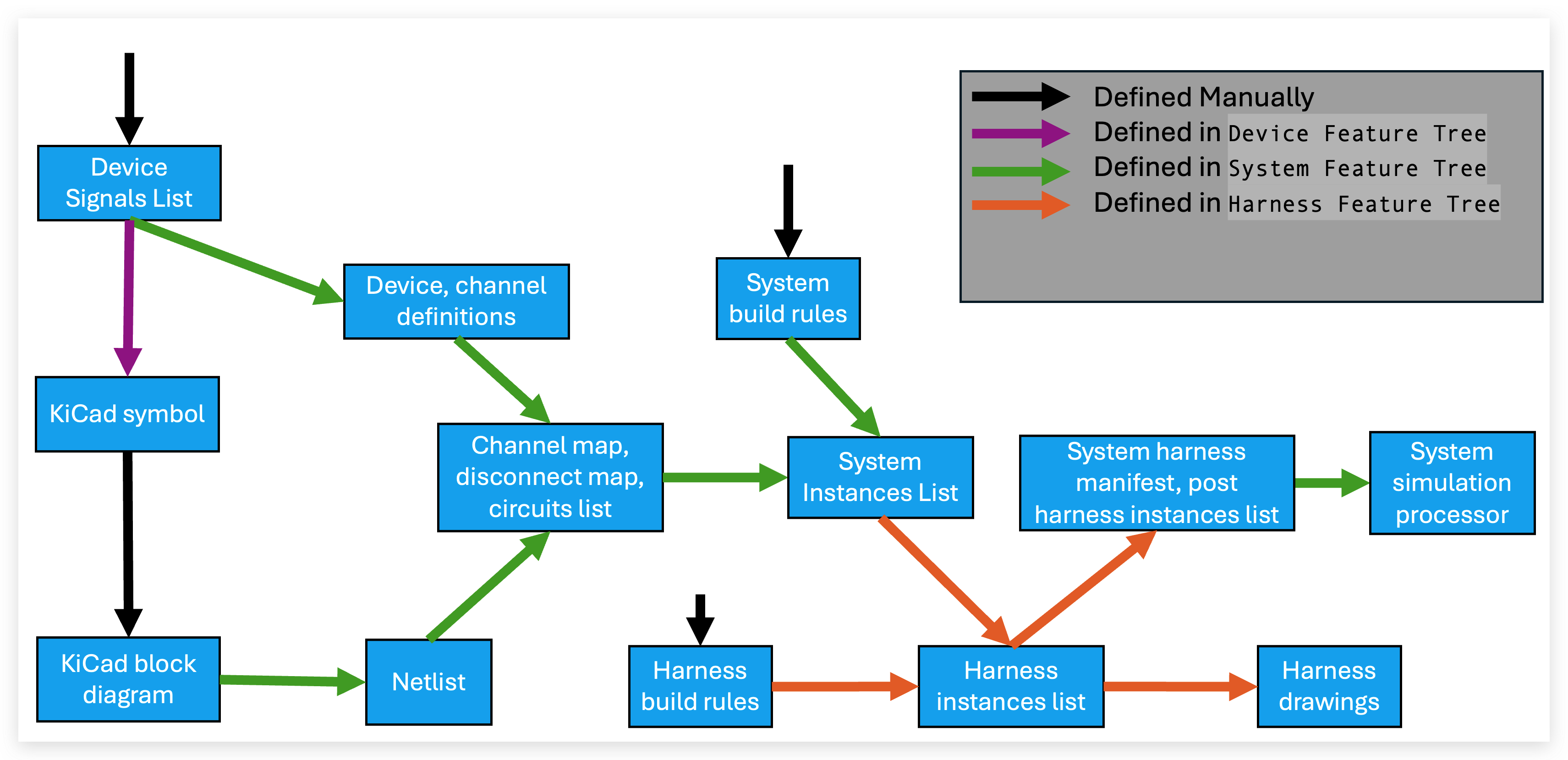
Here's a more detailed diagram of the Harnice workflow including the information covered so far.
Part Numbering
Harnice is designed to work with git: every file format works well with git diff. However, even so, revisions of projects are inevitable: if you release a part, start building it, then realize something needs to change, what do you do?
    graph LR
        A[change in design required] --> B{change in form/fit/function?};
        B -->|Yes| C[new revision<br/>ABC-123-rev2];
        B -->|No| D[new part number<br/>ABC-124-rev1];
Change in form, fit and function is a common way for engineers to draw the line between rolling a rev and rolling a part number.
Harnice bakes revisions into part numbers, allowing you to spend your time worrying about engineering, not configuration management.
Before you build a project, Harnice requires a “rev folder”. Revision history and statuses of a project are stored in a csv, and Harnice will not build a revision if the "status" column is not blank. That column is where you can record if a revision has been released, superseded, obsoleted, etc.
Mapping Vocabulary
Mapping vocabulary
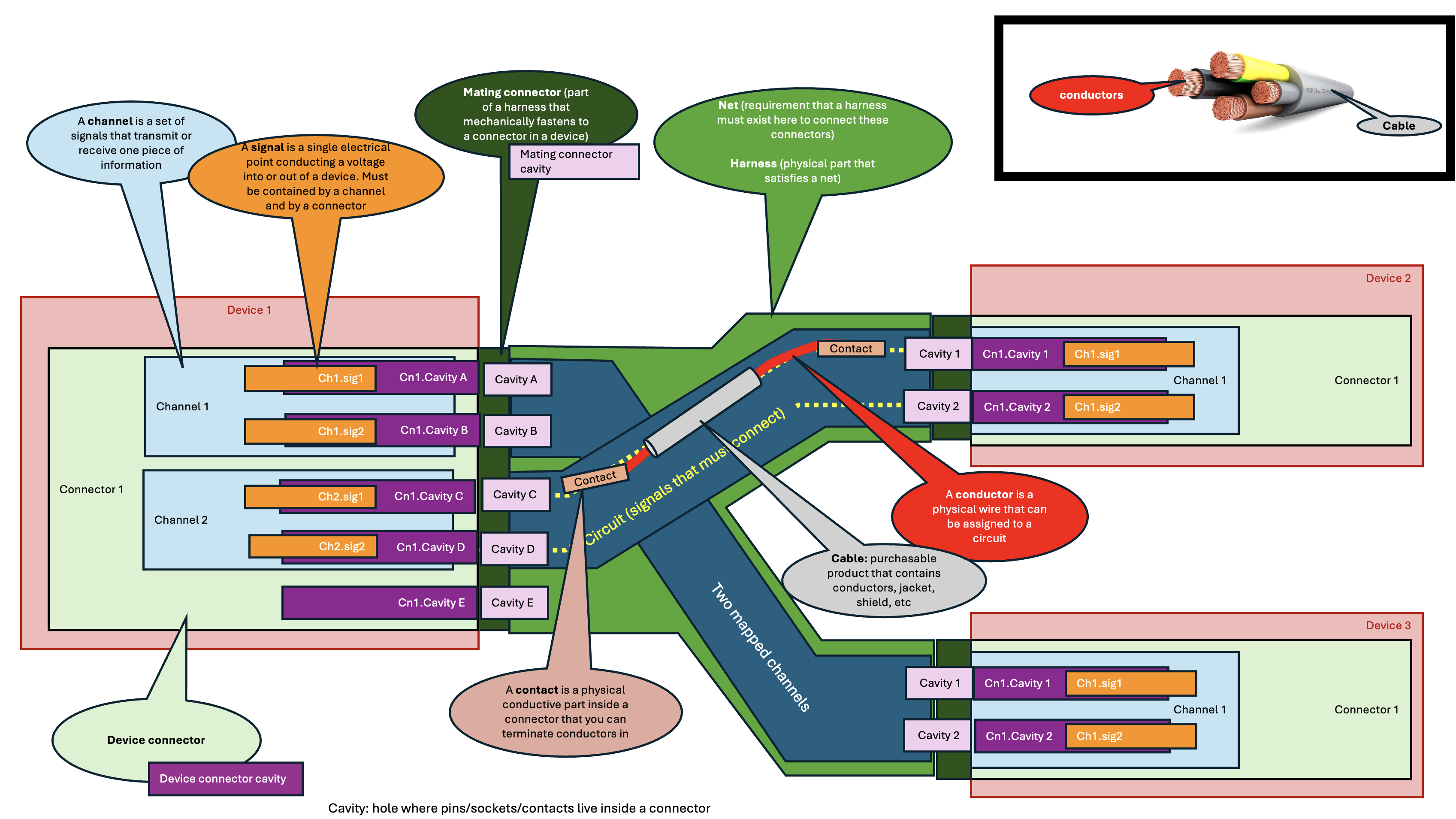
Group of connected harnesses:
- Harnesses linked through passthroughs (or a single standalone harness) that must be considered together. Channel mapping only pairs channels that share the same group.
Channel endpoint:
- One complete instance of a channel on one connector.
Patch:
- A pair of channel endpoints created by
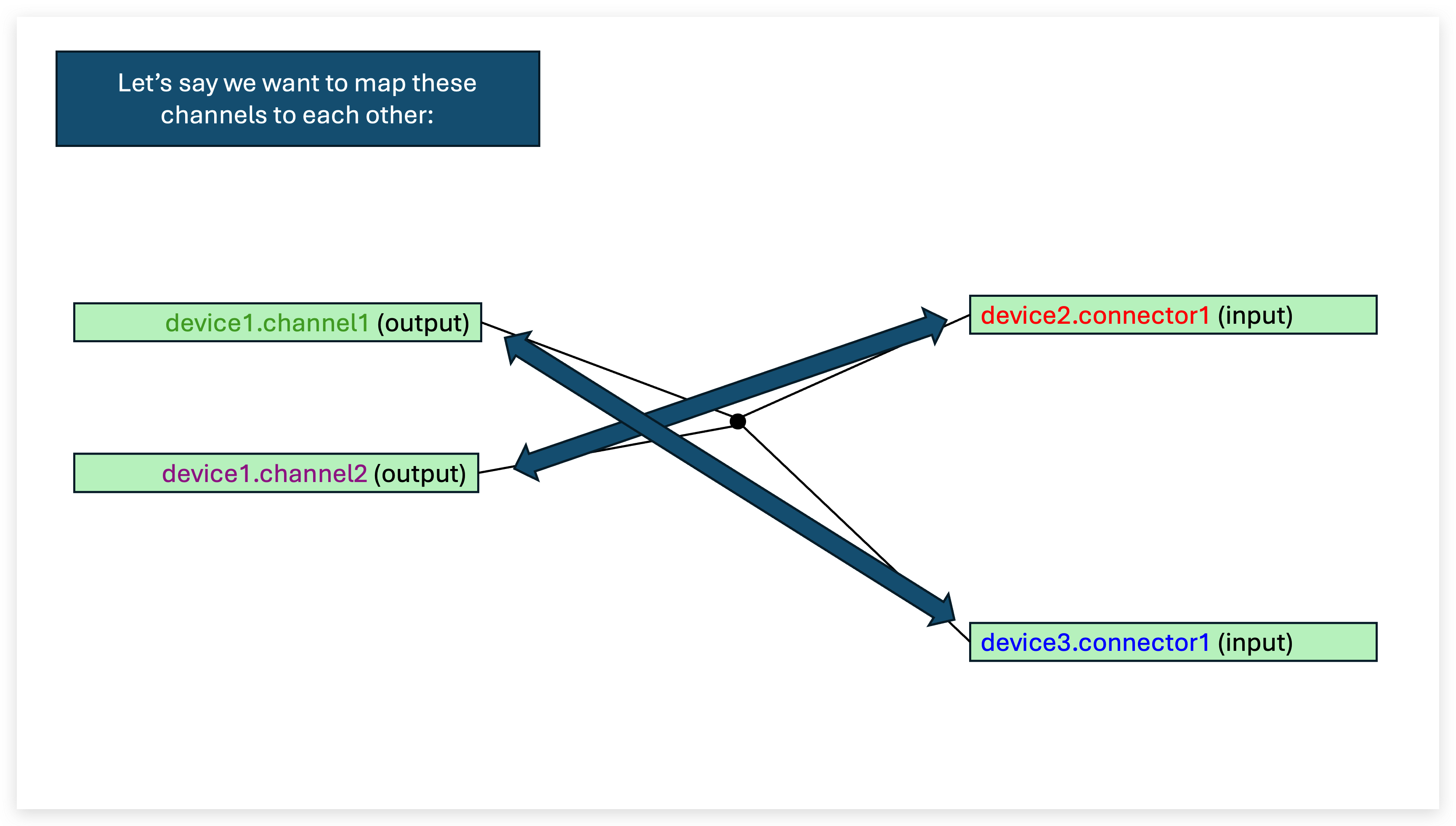
channel_map.map(). Stored in the channel map.
Passthrough:
- A channel with exactly two channel endpoints on the same device.
Map (verb):
- Pair two channel endpoints.
Route (verb):
- Send a patch through a passthrough (
passthrough_map.route()).
Harness:
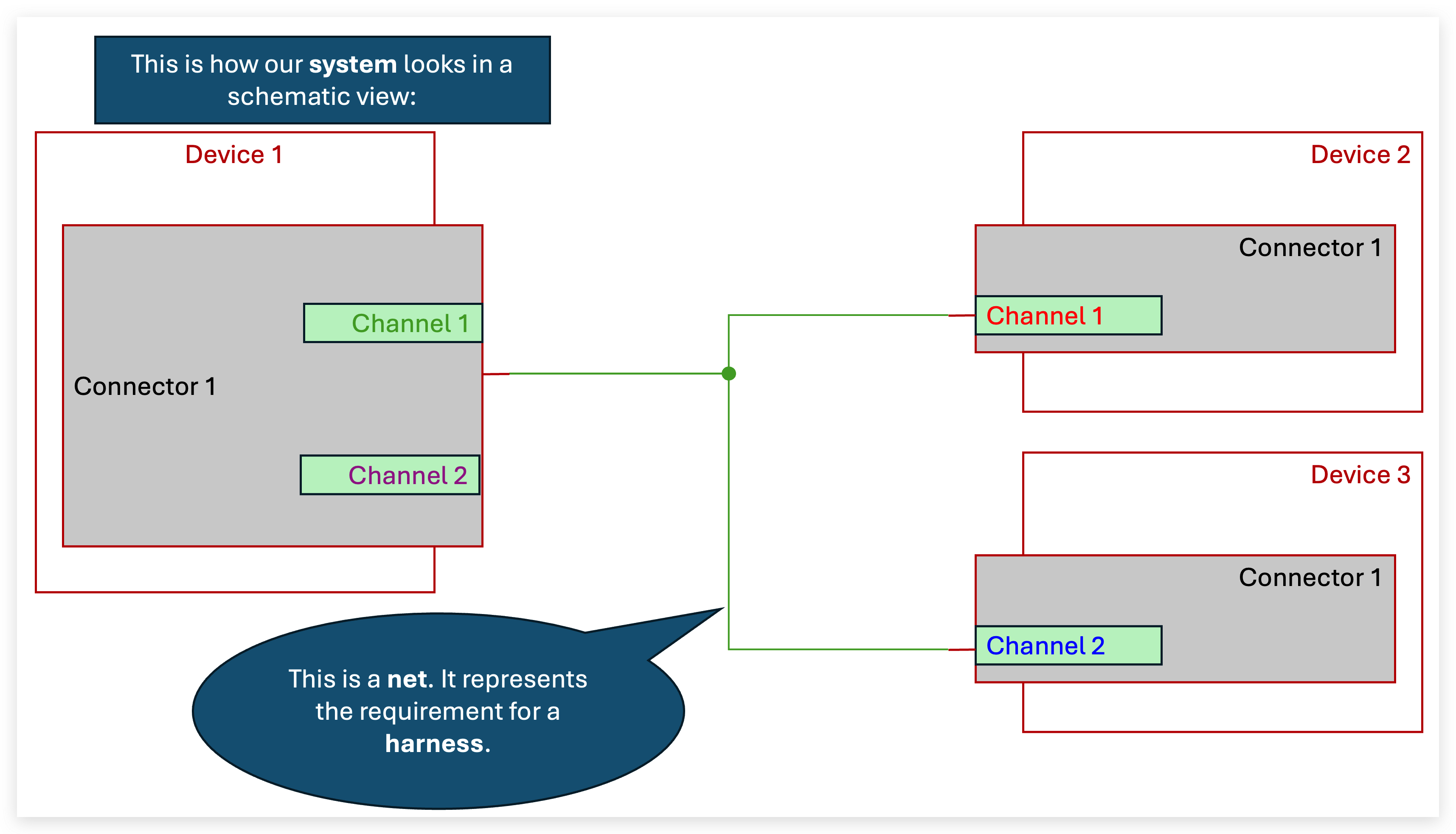
- A harness is an assembly of connectors, cables, and other electrical components that connect multiple devices together. It is the physical item that is built and installed in a system.
Channel:
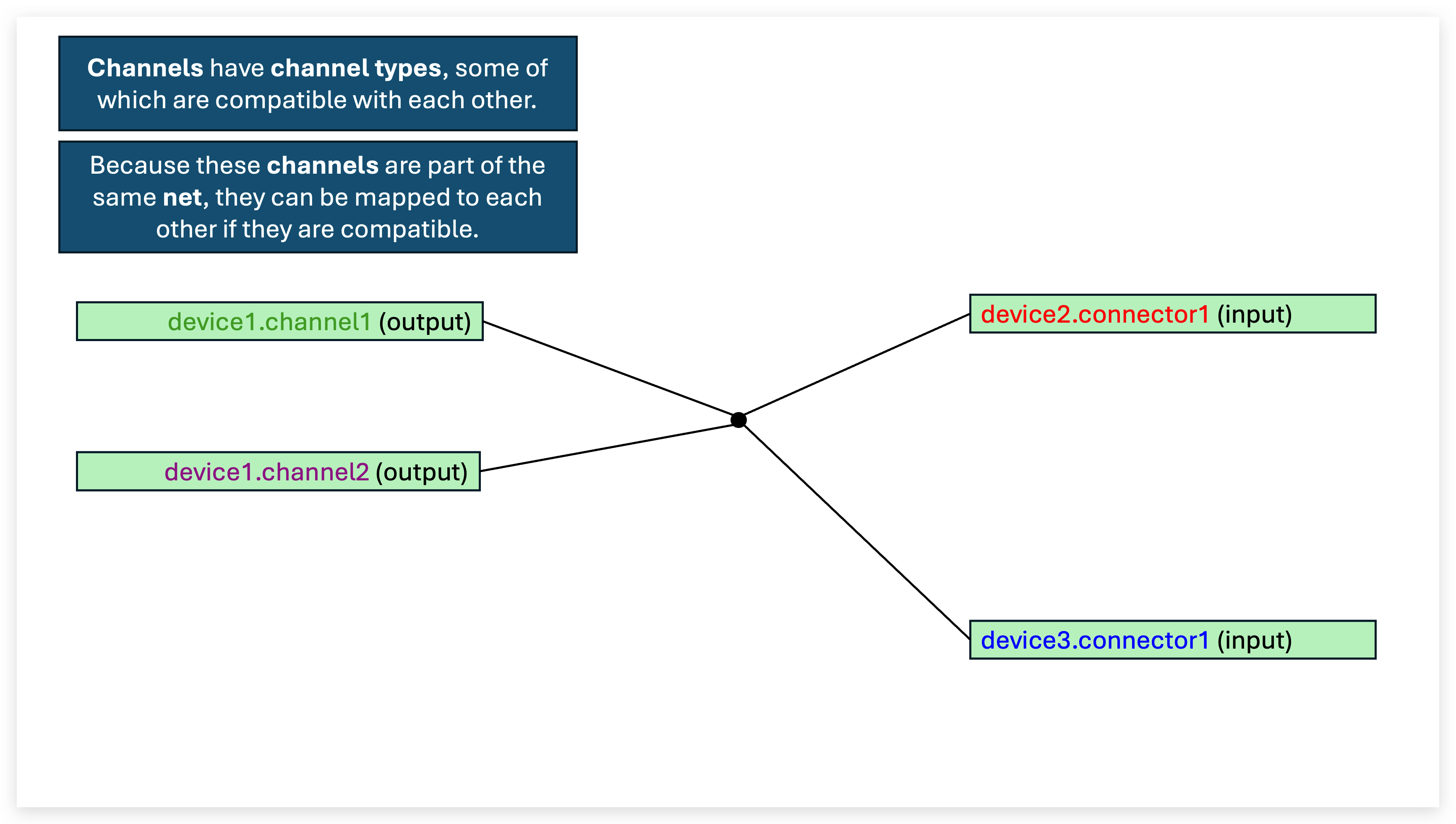
- A channel is a set of electrical signals in a device that together transmit or receive information, power, etc. They have "channel_types" which define their attributes and compatibility with other channels, and contain a list of required signals (pos, neg)
Mapped channel:
- A mapped channel is a connection from one channel on a device to another. They define the functional requirement of any harness, and form the basis of which circuits are generated and where they go. The channel map is the list of mapped channels (and any still-unmapped channels). The passthrough map then routes those mapped channels through passthrough devices.
Signal:
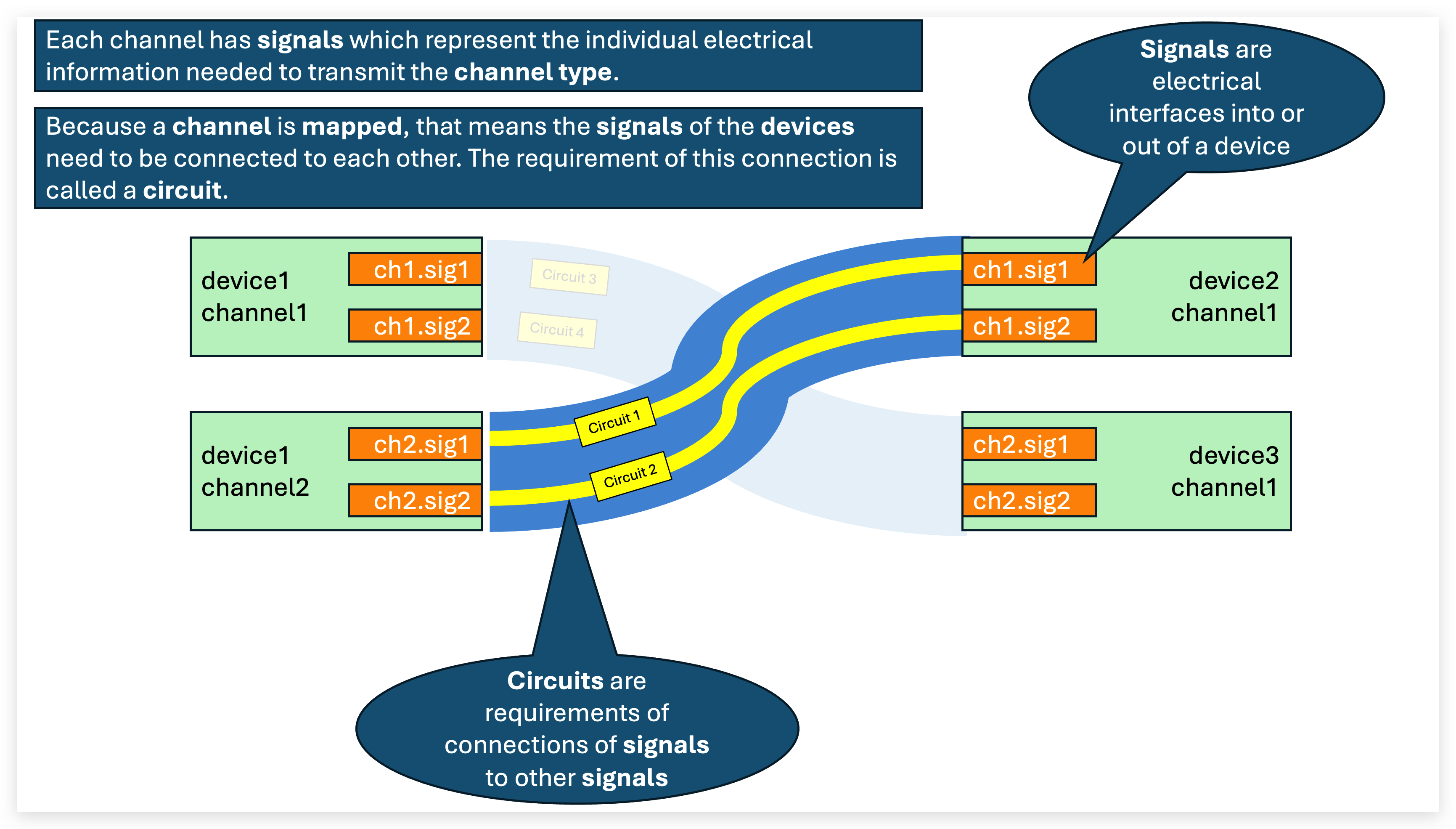
- A signal is a physical conductive part inside a connector of a device that facilitiates electrical interface with the outside world. A signal must be part of a channel and live inside a connector.
Circuit:
- A circuit is the requirement that there must exist an electrical path between two signals of connected devices. You can assign conductors or other electrical elements along it. Instances assigned along the circuit have "circuit ids" which represent the order in which the circuit passes through them.
Conductor:
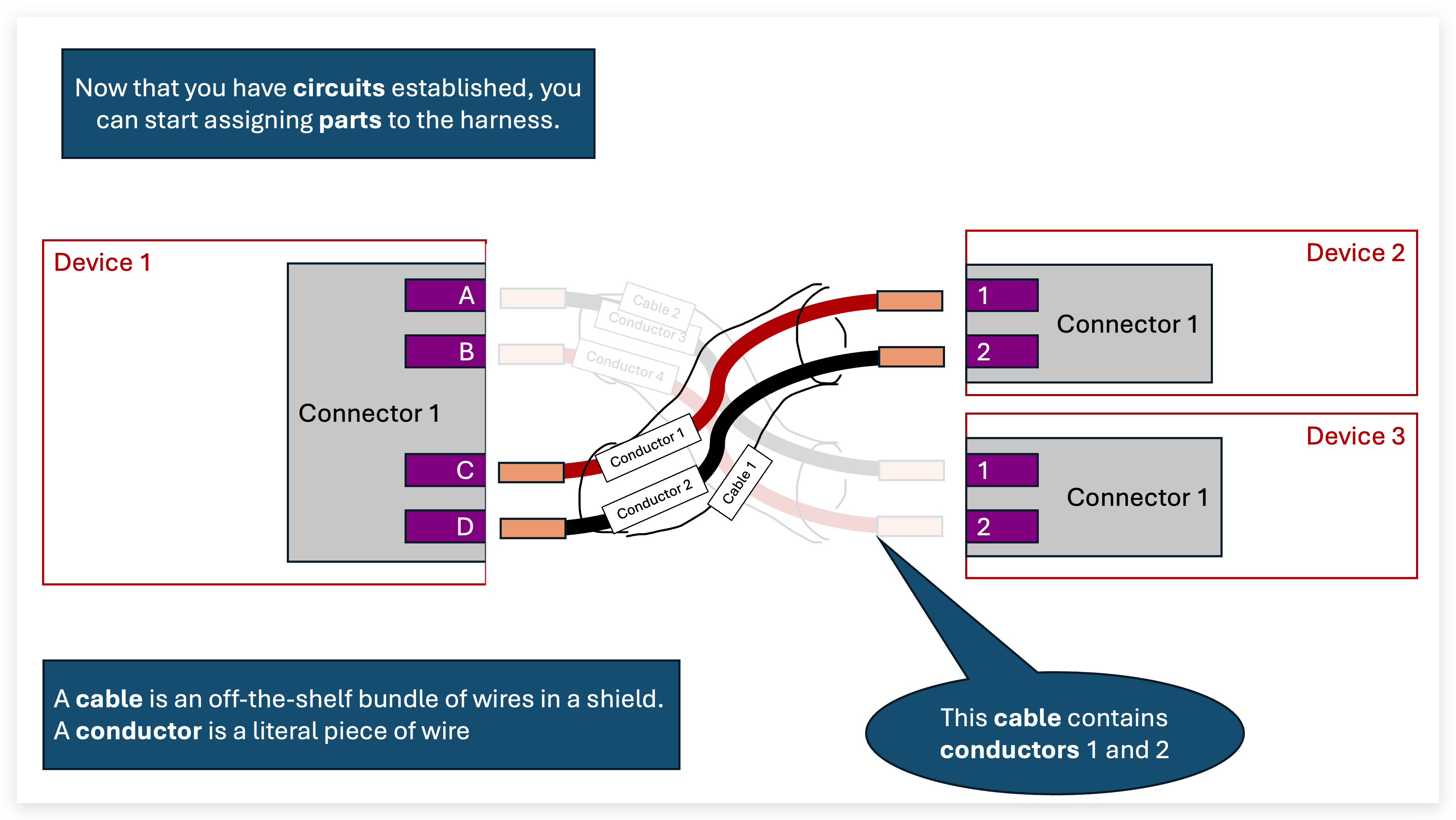
- A piece of copper, sometimes contained in a cable. Has as many properties, appearances, as you need
Cable:
- A cable is a COTS or custom physical item, purchased by length, that contains electrical conductors, and are physically installed inside harnesses.
Less important terms
-
Contact:
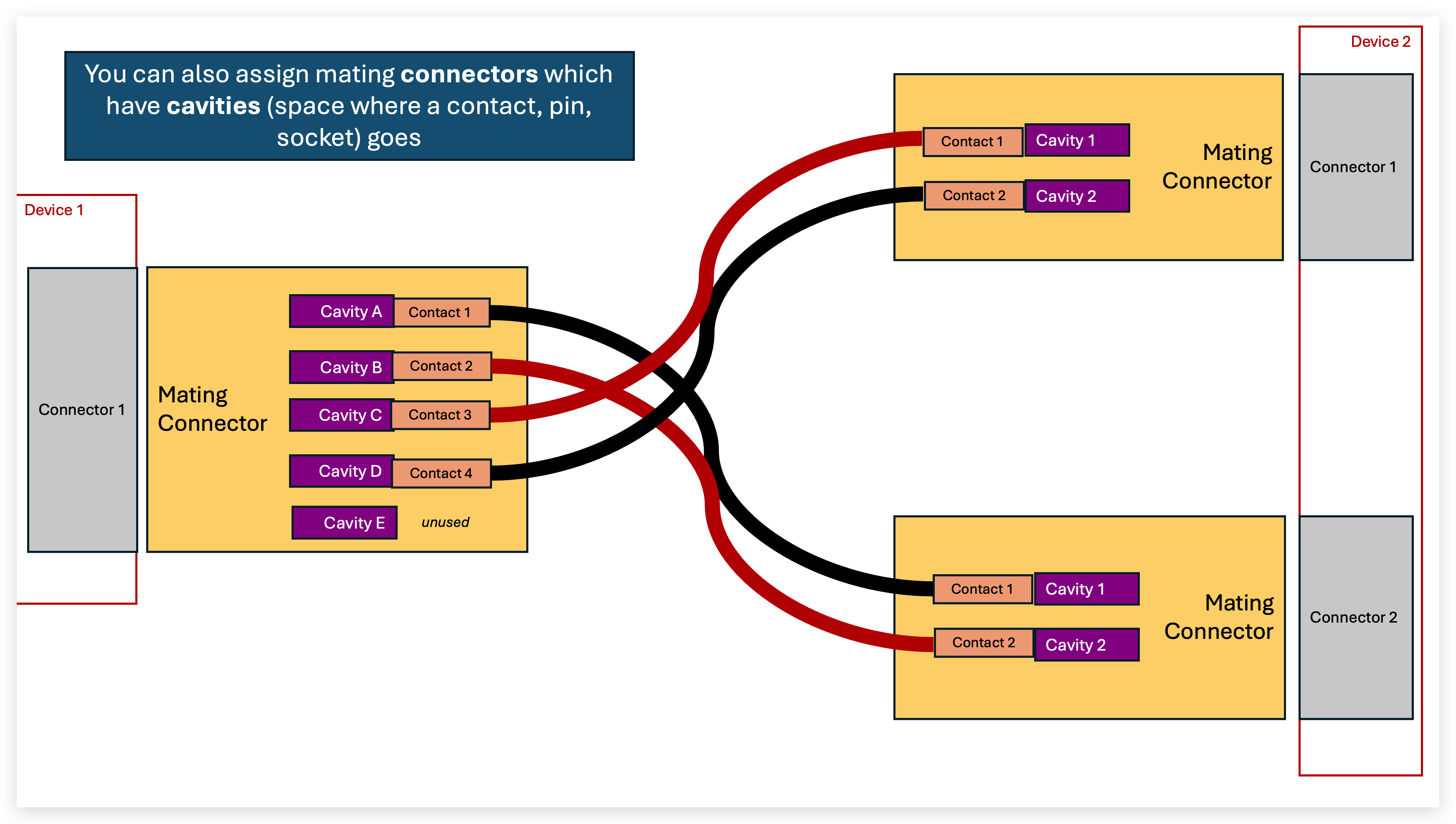
- The metal parts of a connector that does the actual mating with the other connector, allows for termination to a wire. Can be pins, sockets, studs, terminals, etc.
-
Cavity:
- The hole in a connector that physically holds a contact
The Workflow